How to Create a Turo Partner Statement (Co-Host Guide)
A Turo partner statement shows a car owner exactly what their vehicle earned and what they're owed. Here's what to include and how to generate one in seconds.
 By The FleetSnap Team·9 min readUpdated
In this guide
A Turo partner statement (also called an owner statement or a P&L statement) is a per-vehicle breakdown that shows a car owner exactly what their vehicle earned, what was deducted, and what they're owed for the period. If you co-host cars you don't own, it's how you pay owners cleanly -- and how you keep them.
This guide covers what a partner statement is, why it matters once you're managing more than a couple of cars, the exact line items to include, and how to generate one in seconds instead of rebuilding a spreadsheet every month.
What is a Turo partner statement?
A partner statement is a financial summary for one vehicle, for one period, that traces money from the gross trip price down to the owner's payout. It answers the only question an owner actually has: "What did my car make, and what am I getting?"
Turo itself does not generate owner-facing statements for co-hosted vehicles. Turo pays you (the host on the listing), and it's on you to account for each owner's share. The partner statement is the document that does that.
Why co-hosts need them
Once you manage cars for other people, partner statements stop being optional:
- You're paying owners cleanly. A Venmo payment with no context invites disputes. A statement that shows gross, fees, your cut, and their payout ends the "why is this number lower than I expected?" conversation before it starts.
- Transparency is what keeps owners. The fastest way to lose a vehicle owner is to make them feel like they can't see the math. The fastest way to keep them -- and get referrals to more cars -- is a clear monthly statement.
- You need your own numbers, too. The same breakdown tells you which vehicles are actually profitable after costs, and which ones are quietly losing you money.
At 10+ vehicles across multiple owners, rebuilding this by hand every month is where co-hosts lose hours they don't have.
What to include in a Turo partner statement
A complete statement walks from the top-line trip price down to the owner's payout. Every line should be something the owner can verify against their own expectations.
| Line item | What it is | Who it affects |
|---|---|---|
| Gross trip earnings | Total trip price across all trips for this vehicle this period | Starting point |
| Turo host fee | Turo's commission, already deducted before you were paid | Reduces net revenue |
| Net earnings | What actually landed in your Turo payout for this car | The real revenue to split |
| Reimbursements & extras | Tolls, cleaning fees, gas reimbursements, delivery, and other pass-throughs | Added back / owed to owner |
| Vehicle costs | Maintenance, cleaning, repairs, and other deductions you cover and bill back | Reduces owner payout (if agreed) |
| Co-host fee (your split) | Your management fee per your agreement | Your income |
| Owner payout | The single number you're paying the owner | What the owner gets |
Manual vs. automated
There are two ways to produce partner statements.
Manual (spreadsheet). You export your Turo CSV, sort trips by vehicle, write formulas for fees and splits, and rebuild the layout into something an owner can read. It works at 2-3 cars. It breaks down fast as you add vehicles and owners -- one wrong formula or a missed reimbursement and you've underpaid (or overpaid) an owner.
Automated (a tool). You upload the same Turo CSV once, set each vehicle's split, and the statement is generated per vehicle, per owner. No formulas, no reformatting, no monthly rebuild. FleetSnap's earnings tool does exactly this and exports a branded PDF you can send straight to the owner.
A simple worked structure
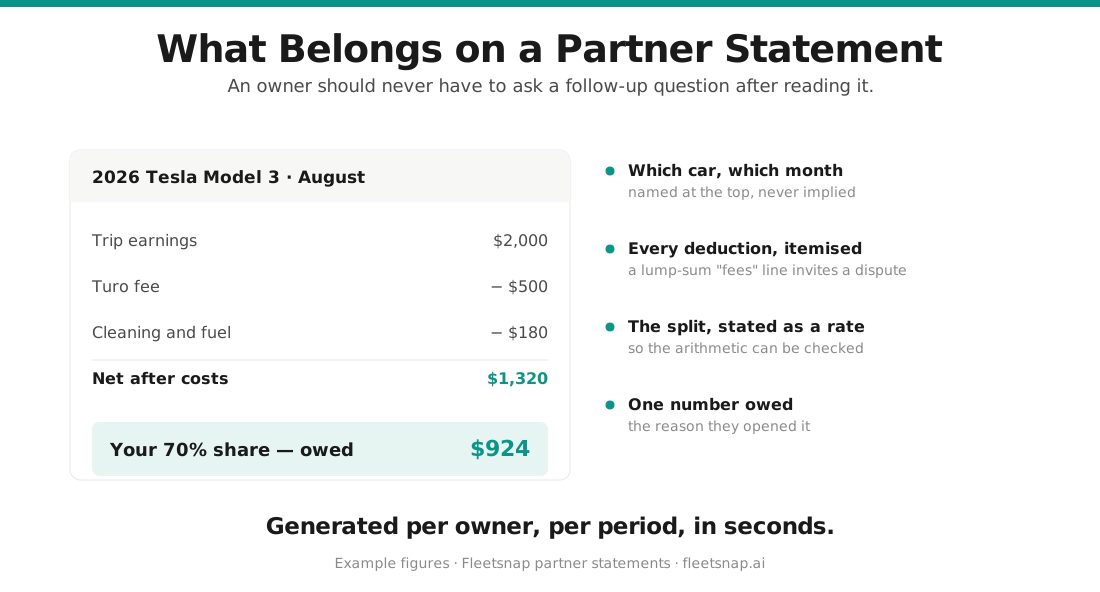
For a single vehicle over one month, a clean statement reads top to bottom:
- Gross trip earnings -- the sum of trip prices
- Less: Turo host fee -- Turo's commission
- = Net earnings -- what you were actually paid
- Plus: reimbursements -- tolls, cleaning, gas owed to the owner
- Less: vehicle costs -- any maintenance or cleaning you bill back (if your agreement covers it)
- Less: your co-host fee -- your management split
- = Owner payout -- the one number the owner is waiting on
Keep the exact percentages and fee structure consistent with your owner agreement, and show the split rate on the statement so nothing is a surprise. Co-hosts who send a clear statement like this every month give owners no reason to wonder where their money went -- which is exactly what keeps owners (and their cars) with you.
Common partner-statement mistakes
- Splitting on the gross trip price instead of your net payout after Turo's fee.
- Forgetting reimbursements -- tolls, cleaning, and gas the owner is owed.
- Inconsistent fee structures across owners, so you can't reconcile your own books.
- Sending a raw spreadsheet -- owners want a clean, readable summary, not your working file.
- No per-vehicle cost tracking, so you never learn which cars actually make money.
"The best partner statement tool out there"
Timmy Ma runs 150-200 cars across 10 owners at AH360 LLC -- and says FleetSnap saves him 19 hours a week on partner statements.

Questions hosts ask
What is a Turo partner statement?
A Turo partner statement (or owner statement) is a per-vehicle financial summary that traces money from the gross trip price down to the owner's payout -- showing gross earnings, Turo's fee, reimbursements, your co-host fee, and the net owed to the owner. Turo doesn't generate these for co-hosted cars, so the host produces them.
How do I pay Turo car owners as a co-host?
Settle per vehicle, per period. Start from your actual Turo payout (after Turo's host fee), add any reimbursements the owner is owed, subtract agreed vehicle costs and your co-host fee, and pay the remaining owner payout -- with a statement that shows each line. Paying without a statement is the fastest way to create disputes.
What should a Turo partner statement include?
Gross trip earnings, Turo's host fee, net earnings, reimbursements and extras (tolls, cleaning, gas), any vehicle costs you bill back, your co-host fee, and the final owner payout. Showing the split rate on the statement keeps everything transparent.
What's the difference between gross and net on a Turo statement?
Gross is the total trip price guests paid. Net is what you actually received after Turo's host fee (which varies by protection plan). Always calculate the owner's split on net, not gross -- splitting on gross overpays the owner relative to what you were actually paid.
Do I have to create Turo partner statements manually?
No. Manual spreadsheets work at a couple of cars but break down at scale. FleetSnap's earnings tool imports your Turo CSV, applies each vehicle's split, and generates per-vehicle partner statements as branded PDFs in seconds -- no formulas or monthly rebuild.
How often should I send partner statements to owners?
Monthly is standard and matches how most owners think about income. Send a clean statement at the same time each month alongside the payout. Consistent, transparent reporting is the biggest driver of owner trust and retention.